Modernizing AWS Infrastructure with CDK and GitHub Actions
This is a personal project. Full implementation available on GitHub.
TechHealth Inc. is a healthcare technology company whose AWS infrastructure was initially built manually through the AWS Console five years ago. Over time, this approach led to growing challenges in terms of maintainability, security, and scalability, including the lack of version control, inconsistent configurations, and limited environment reproducibility.
This project focused on modernizing that legacy setup to deliver a cloud environment that was scalable, reliable, and secure, aligned with current infrastructure best practices.
Table of Contents
Restructuring Plan
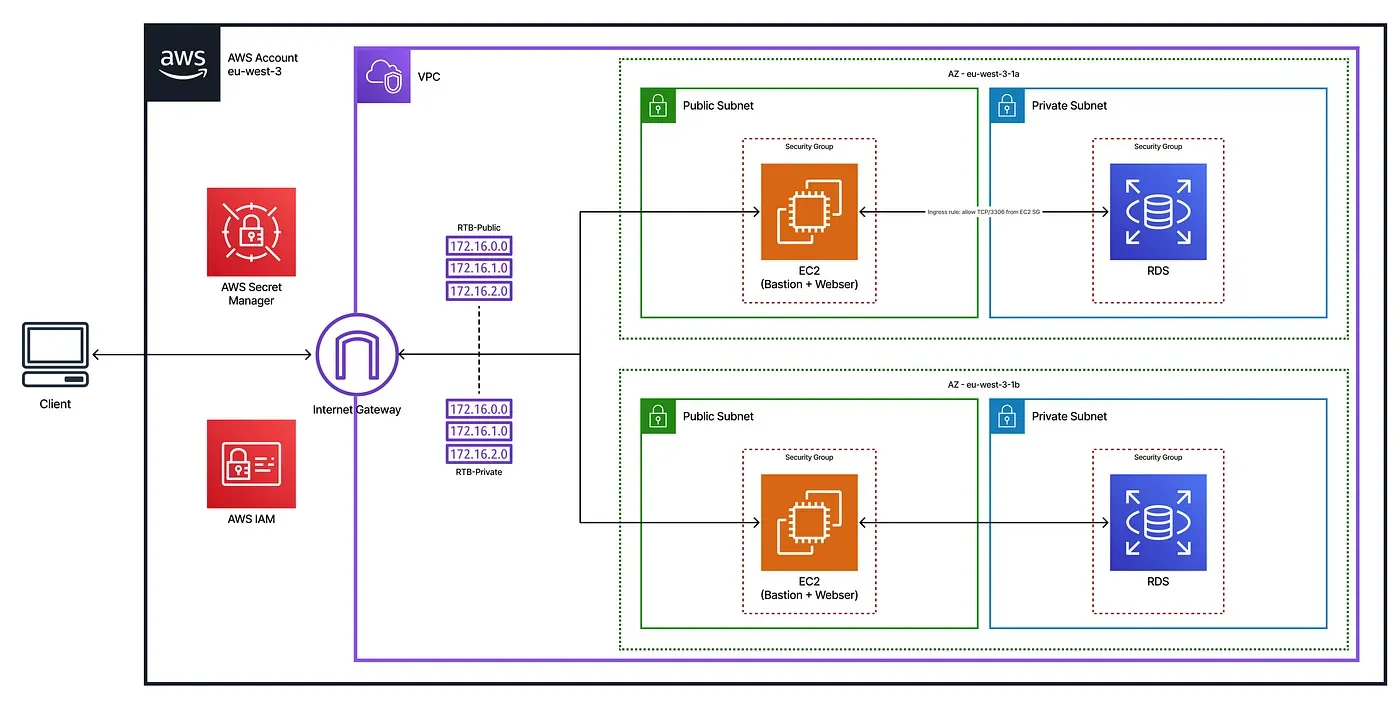
The legacy AWS infrastructure at TechHealth was restructured using Infrastructure as Code with AWS CDK, enabling full reproducibility, version control, and consistent provisioning. The new architecture improves both security and cost-efficiency, with infrastructure changes automatically validated and deployed through a CI/CD pipeline powered by GitHub Actions.
To achieve this, we addressed the following pain points:
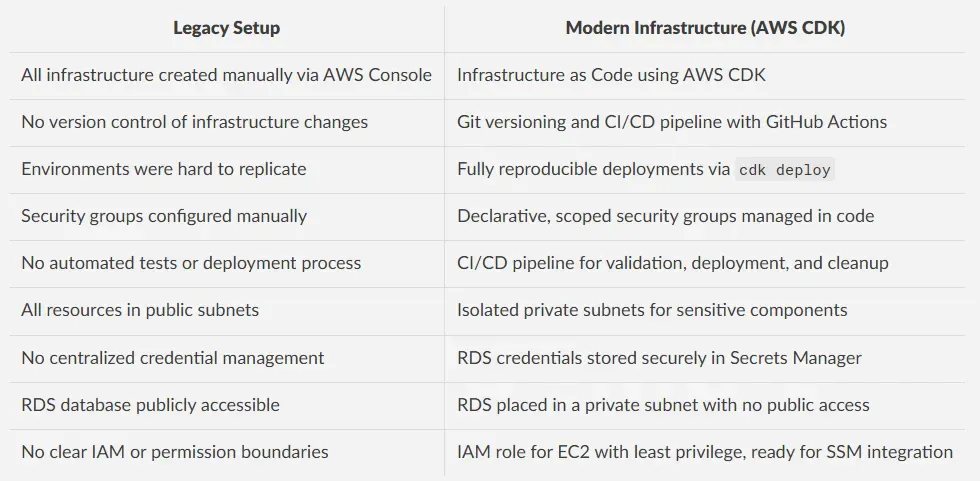
Each infrastructure component was defined declaratively, making the system both auditable and maintainable. The new VPC design introduced network isolation by placing the RDS database in private subnets, while the EC2 instance resides in a public subnet with restricted SSH access.
IAM roles followed the principle of least privilege, and Secrets Manager securely managed database credentials.
With this setup, TechHealth was able to deploy its environment using a single cdk deploy command, while ensuring security standards and operational efficiency.
CDK Infrastructure Breakdown
The entire infrastructure was implemented in a single TypeScript CDK stack, ensuring modularity, reproducibility, and security.
VPC and Subnets
A Virtual Private Cloud (VPC) was created with two Availability Zones, each containing one public and one private isolated subnet. This structure provides clear network segmentation and prepares the environment for scalable multi-AZ setups.
const vpc = new ec2.Vpc(this, 'MigrationVPC', {
  maxAzs: 2,
  subnetConfiguration: [    {
      cidrMask: 24,
      name: 'PublicSubnet',
      subnetType: ec2.SubnetType.PUBLIC,
    },
    {
      cidrMask: 24,
      name: 'PrivateSubnet',
      subnetType: ec2.SubnetType.PRIVATE_ISOLATED,
    },
  ],
});
Security Groups
Two security groups were defined:
- One for the EC2 instance, allowing SSH (port 22) and HTTP (port 80) access.
- One for the RDS instance, allowing MySQL traffic (port 3306) only from the EC2 security group, ensuring least privilege network access.
const ec2SecurityGroup = new ec2.SecurityGroup(this, 'EC2SecurityGroup', {
  vpc,
  allowAllOutbound: true,
  description: 'Security group for EC2 instance',
});
// Replace with your actual IP address and use CIDR notation (e.g., "203.0.113.10/32")
const myIp = ec2.Peer.ipv4('YOUR_IP_ADDRESS_HERE/32');
ec2SecurityGroup.addIngressRule(myIp, ec2.Port.tcp(22), 'Allow SSH from my IP');
ec2SecurityGroup.addIngressRule(ec2.Peer.anyIpv4(), ec2.Port.tcp(80), 'Allow HTTP');
const rdsSecurityGroup = new ec2.SecurityGroup(this, 'RDSSecurityGroup', {
  vpc,
  allowAllOutbound: true,
  description: 'Security group for RDS instance',
});
rdsSecurityGroup.addIngressRule(ec2SecurityGroup, ec2.Port.tcp(3306), 'Allow MySQL from EC2');
IAM Role for EC2
An IAM role is attached to the EC2 instance to allow basic secure operations. It includes the AmazonSSMManagedInstanceCore managed policy, which enables future support for AWS Systems Manager (SSM) if needed.
const ec2Role = new iam.Role(this, 'EC2IAMRole', {
  assumedBy: new iam.ServicePrincipal('ec2.amazonaws.com'),
});
ec2Role.addManagedPolicy(iam.ManagedPolicy.fromAwsManagedPolicyName('AmazonSSMManagedInstanceCore'));
EC2 Instance
A t3.micro EC2 instance was deployed into the public subnet, associated with its security group and IAM role. It is accessible via SSH and acts as a gateway to the private RDS instance.
const ec2Instance = new ec2.Instance(this, 'MigrationEC2', {
  vpc,
  vpcSubnets: { subnetType: ec2.SubnetType.PUBLIC },
  instanceType: ec2.InstanceType.of(ec2.InstanceClass.T3, ec2.InstanceSize.MICRO),
  machineImage: new ec2.AmazonLinuxImage({
    generation: ec2.AmazonLinuxGeneration.AMAZON_LINUX_2,
  }),
  securityGroup: ec2SecurityGroup,
  role: ec2Role,
});
RDS MySQL Database
A MySQL RDS instance was provisioned in the private subnet to ensure it is not publicly accessible. It allows incoming connections only from the EC2 instance, following the least privilege principle. The instance uses the Free Tier–eligible db.t3.micro class.
new rds.DatabaseInstance(this, 'MigrationRDS', {
  engine: rds.DatabaseInstanceEngine.mysql({ version: rds.MysqlEngineVersion.VER_8_0 }),
  vpc,
  vpcSubnets: { subnetType: ec2.SubnetType.PRIVATE_ISOLATED },
  securityGroups: [rdsSecurityGroup],
  instanceType: ec2.InstanceType.of(ec2.InstanceClass.BURSTABLE3, ec2.InstanceSize.MICRO),
  allocatedStorage: 20,
  removalPolicy: cdk.RemovalPolicy.DESTROY,
});
Testing & Validation
To ensure the infrastructure was functioning correctly and securely, I manually validated the key components after deployment.
SSH Access
I verified that the EC2 instance could be accessed securely from my IP address using an SSH key.
$ ssh -i mykeypair.pem ec2-user@15.237.248.31
   ,     #_
   ~\_  ####_        Amazon Linux 2
  ~~  \_#####\
  ~~     \###|       AL2 End of Life is 2026-06-30.
  ~~       \#/ ___
   ~~       V~' '->        A newer version of Amazon Linux is available!
    ~~~         /
      ~~._.   _/
         _/ _/       Amazon Linux 2023 available: https://aws.amazon.com/linux/
       _/m/'
[ec2-user@ip-10-0-0-114 ~]$
Database Connectivity
I successfully connected to the RDS MySQL database from the EC2 instance using credentials securely stored in Secrets Manager.
$ mysql -h awsmigrationstack-migrationrds7e06c147-zgayq0i7ssug.cvsec4ggy3fw.eu-west-3.rds.amazonaws.com -u admin -p
Enter password:
Welcome to the MariaDB monitor.  Commands end with ; or \g.
Your MySQL connection id is 28
Server version: 8.0.41 Source distribution
Copyright (c) 2000, 2018, Oracle, MariaDB Corporation Ab and others.
Type 'help;' or '\h' for help. Type '\c' to clear the current input statement.
MySQL [(none)]>
Security Validation
I attempted to connect to the RDS instance from outside the VPC to confirm that it was not publicly accessible.
$ mysql -h awsmigrationstack-migrationrds7e06c147-zgayq0i7ssug.cvsec4ggy3fw.eu-west-3.rds.amazonaws.com -u admin -p
Enter password:
ERROR 2003 (HY000): Can't connect to MySQL server on 'awsmigrationstack-migrationrds7e06c147-zgayq0i7ssug.cvsec4ggy3fw.eu-west-3.rds.amazonaws.com:3306' (110)
Network Isolation
The RDS instance is deployed in a private subnet. This is verified by both metadata and the absence of an Internet Gateway route.
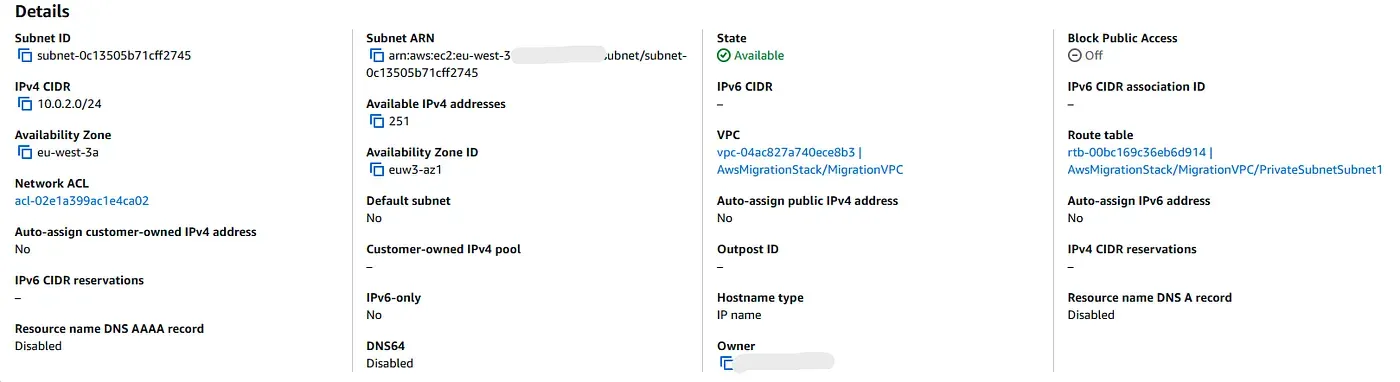 Auto-assignment is disabled, meaning instances in this subnet do not receive a public IP address.
 The route table does not include a route to an Internet Gateway, which confirms that this subnet is isolated from the public internet.
CI/CD Workflow
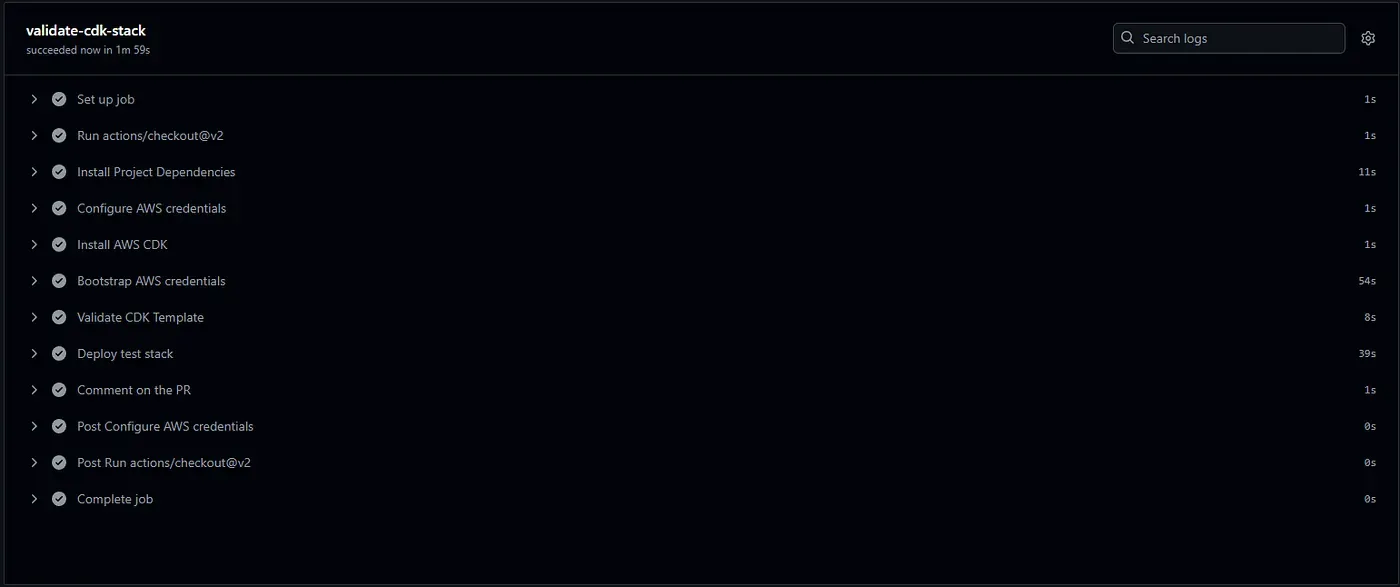
Every pull request triggers a CI/CD pipeline using GitHub Actions. This workflow installs CDK, synthesizes the infrastructure templates, deploys a temporary test stack, and posts a comment directly in the pull request to confirm the deployment status.
If the PR is merged, the pipeline automatically destroys the test stack and redeploys the latest stable version of the infrastructure, ensuring the AWS environment stays clean and up to date.
Below is a breakdown of the main jobs within the CI/CD pipeline:
validate-cdk-stack
This job runs on every pull request. After installing CDK and synthesizing the templates, it deploys a temporary test stack without requiring manual approval, then comments the result directly in the PR.
- name: Deploy test stack
  run: |
    cdk deploy --all --require-approval never --context prNumber=${{ github.event.pull_request.number }}
- name: Comment on the PR
  uses: actions/github-script@v6
  with:
    github-token: ${{ secrets.GITHUB_TOKEN }}
    script: |
      github.rest.issues.createComment({
        issue_number: context.issue.number,
        owner: context.repo.owner,
        repo: context.repo.repo,
        body: '✅ AWS CDK test stack deployed successfully.'
      })

cleanup-on-merge
This job runs only when a pull request is merged. It ensures the AWS account remains clean by destroying the temporary test stack and then deploying the latest stable version of the infrastructure.
- name: Delete Test Stack
  run: |
    cdk destroy --all --require-approval never --context prNumber=${{ github.event.pull_request.number }}
- name: Update current CDK Stack
  run: |
    cdk deploy --all --require-approval never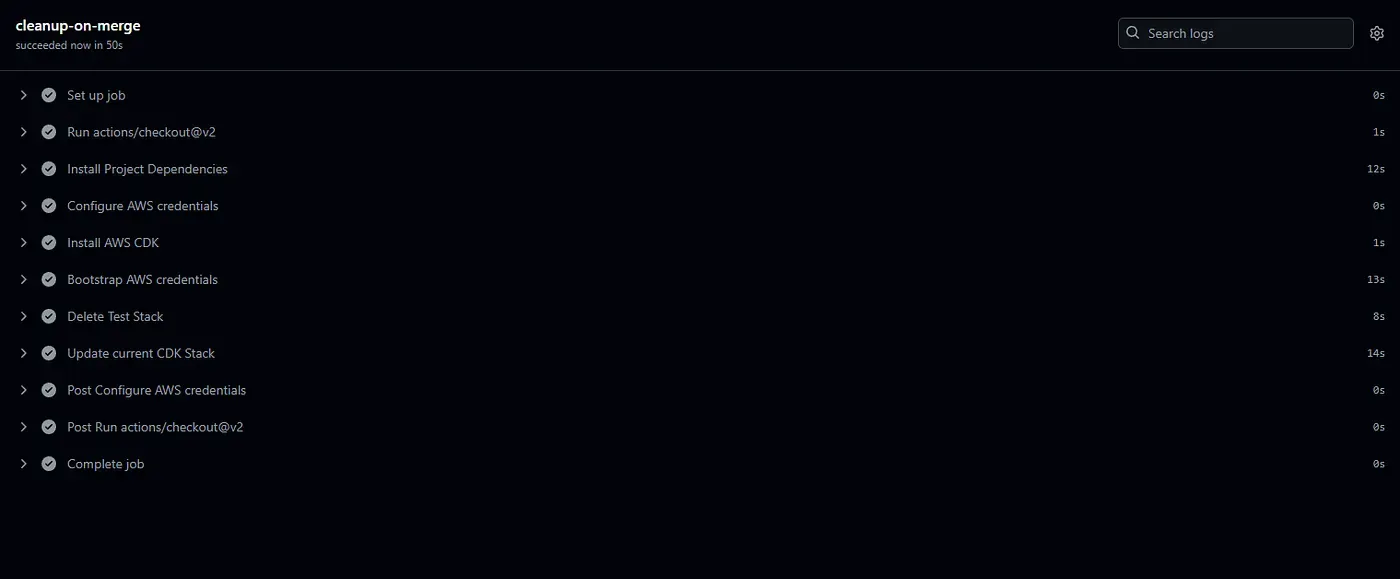
By using this pipeline, every infrastructure change is tested in isolation, automatically cleaned up after merging, and safely deployed to production. This ensures fast feedback, safer collaboration, and a clean AWS environment.
Conclusion
This project led to a complete transformation of TechHealth’s AWS infrastructure into a modern, secure, and automated environment using AWS CDK.
The new architecture introduces clear network segmentation through public and private subnets, along with strict access control enforced by scoped IAM roles and security groups. Deployments are now fully reproducible and integrated into a GitHub Actions CI/CD pipeline, ensuring continuous validation and clean infrastructure management.
By using Free Tier–eligible instances, removing unnecessary resources, and automating cleanup on merge, the system achieves effective cost optimization.
Overall, this migration greatly improves the reliability, security, and scalability of TechHealth’s cloud environment and demonstrates the power of Infrastructure as Code and DevOps automation.